
To view archived documents you can follow the steps below:
1. Log into www.eify.com
2. Select the principle contractor
3. Select the project from the list
4. Select the manage employees option

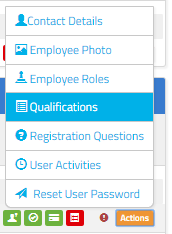
5. Find the employees name in the list and click on the actions button to the far right of their name. Then click on qualifications to go through to their qualifications page
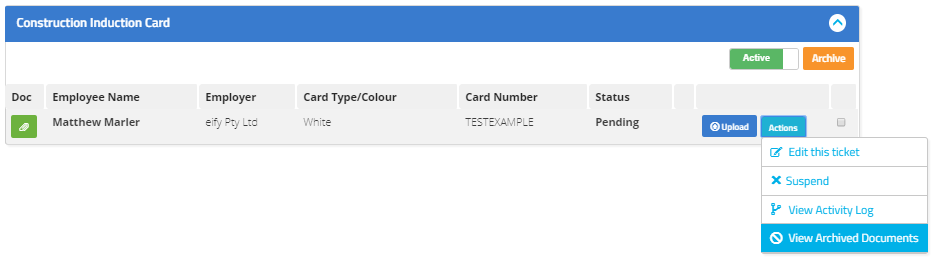
6. On the qualifications page you can view a specific qualifications archived tickets by pressing the actions button and then the view archived documents option.
7. You will then be able to view the individually uploaded documents and see rejection reasons if they have been rejected. To view any of the documents click on the corresponding magnifying glass.
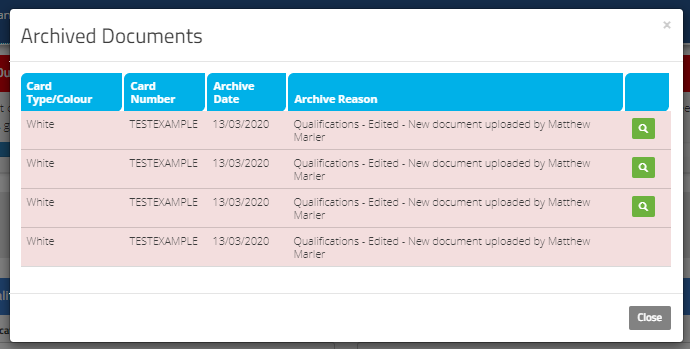
If the qualifications themselves have been archived there will be an option to toggle between active and archived qualifications at the top of the screen.


Toggling between the two will allow you to see all qualifications that have ever been uploaded onto a users profile.
Comments
0 comments
Please sign in to leave a comment.