
Manual Document Upload – Expired Qualifications
Optimise your portal navigation by knowing where to upload declined documents during the induction approval process, additional qualifications, and renew expired documents.
How to renew expired paperwork
To renew expired paperwork,
- Hover the mouse to Employees then select Expiry Dates
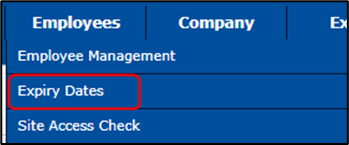
OR click Expiry Dates on the home page

- By default, the Expiry Dates page will display paperwork that will expire within a month.
Modify the displayed expiry information by changing it to at least to display a month's worth of expired items.

- Look for the appropriate category (Company-wide, Medicals, Qualifications, etc.)

- Across the employee’s name, click
- Provide the expiry date and upload the document by clicking


- Submit the paperwork by clicking

Note: Paperwork will be reviewed within 24-48 hours. You will receive an e-mail notification for declined paperwork, but no notification for approved ones.
Comments
0 comments
Please sign in to leave a comment.