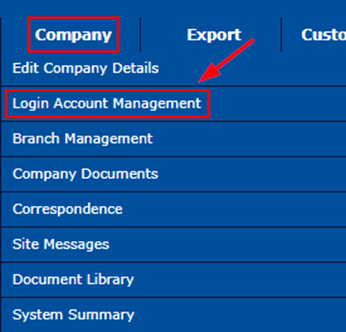
Click the Company Tab, then select Login Account Management
Click the Portal Accounts to see who the current Account Holders for your Company are
At the bottom part, click the if you intend to Add New Account Holder
A pop-up window will appear, fill out the information needed, then click Add User
Account Holders are limited to 5 users, but if the company requires more than 5 users, you can send an email request to service@damstratechnology.com for the 6th user and so forth using the below template.
The letter must be on Company Letter Head and signed by a Manager
The Name of the current account holder and the reason why you need to change the account holder (applicable for changing the account holder)
The Name, Position, Email Address, and Contact Number of the new company representative/account holder.

 if you intend to Add New Account Holder
Comments
0 comments
Please sign in to leave a comment.