
How to Check Completed Lessons
Check all completed lessons on your computer or through the convenience of your mobile phone.
How to check completed lessons via web browser
- Login to your account.
- Go to
 menu on the left side
 - Lesson Results page will display the lesson title, its version, completion date, whether it is an assessment, any CPD points, and notes.
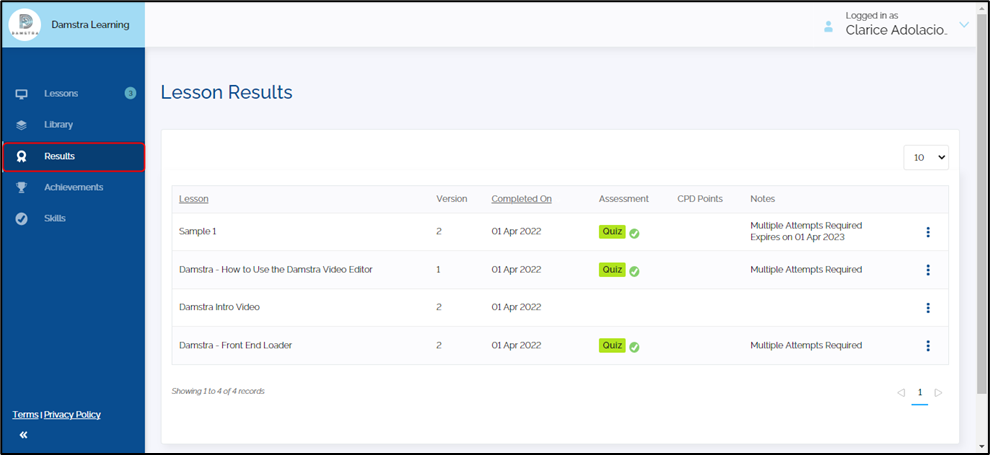
Note: Click the ellipsis  to show the download certificate option.
How to check completed lessons via mobile app
- Login to your account.
- Go to
 menu at the bottom part of the screen
 - Lesson Results will display the lesson title, completion date, and whether it is an assessment.
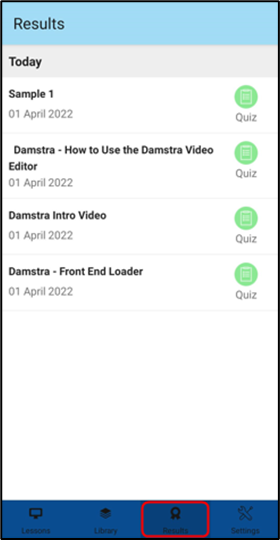
Note: Certificates can only be downloaded on a web browser. It is not an option in the mobile app.
Failed Lessons:
Damstra Learning is a user-friendly e-learning platform where users may upload, create, and watch lessons. Configuration and management are done by the account owner, admin, and supervisor roles.
In that sense, if you failed a lesson, it would be best to consult with your admin, and/or supervisor if you may retake the lesson.
There are also instances the lessons will be reassigned to you when you fail the assessment. This is dependent on the rule (Failed Lesson Rule) configured by the account owner, admin, or supervisor.
Comments
0 comments
Please sign in to leave a comment.